
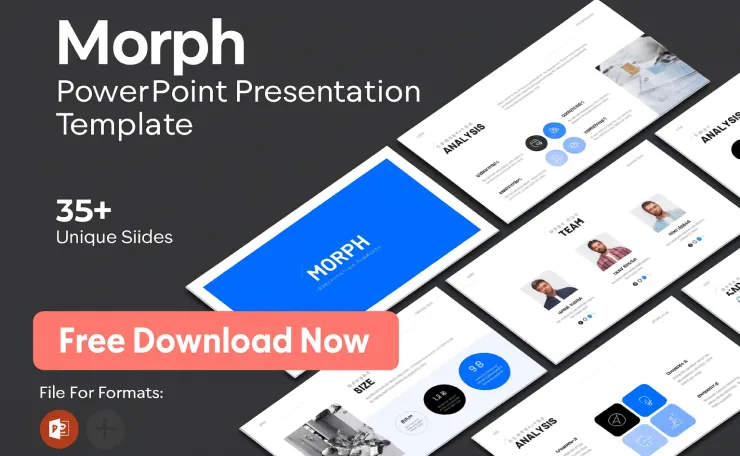
If you’ve ever faced a blank slide and felt a wave of dread, you’re not alone. Crafting a presentation that is both visually compelling and professionally polished is a challenge. The secret weapon of effective communicators—from startup founders to educators—is a well-chosen PowerPoint Presentation Template. This guide will help you navigate the vast world of templates, from presentation slide templates on Google Slides to premium designs, ensuring your next presentation is your best one yet.
Why Your Choice of Template Matters More Than You Think

A presentation template is far more than just a decorative background. It is the structural and visual foundation of your entire message. In a world where attention spans are limited, the design of your slides can be the difference between engaging your audience and losing them completely.
Using a professional presentation slide template offers concrete benefits:
- Saves Precious Time: Instead of designing from scratch, you can focus on refining your content and narrative.
- Ensures Brand Consistency: Templates provide a uniform style for colors, fonts, and layouts, making your presentation look cohesive and credible.
- Enhances Visual Appeal and Clarity: A good template uses visual hierarchy to guide your audience’s eye, making complex information easier to digest.
- Boosts Your Confidence: Presenting with sleek, professional slides allows you to deliver your message with greater authority.
Free Download

- 【BRIGHT RED LIGHT】 This wireless presenter remote is with a bright red light which is easy to see against most backgroun…
- 【EASY TO USE】 Plug & play, no need to download software (For mac, you may need to complete an easy set-up first). The po…
- 【PERFECT SIZE & ERGONOMIC DESIGN】 Compact but perfect size, meeting ergonomic principle, it is comfortable to hold in ha…
$14.99
How to Choose the Right PowerPoint Presentation Template: A Step-by-Step Guide

With thousands of free presentation templates and premium options available, selecting the right one can be overwhelming. Follow these key criteria to make an informed choice.
1. Define Your Presentation’s Core Purpose
Every presentation has a goal. Your template should align with and support that objective.
- Business & Corporate: Opt for clean, professional designs with neutral colors and ample space for data. Templates like the “Elegant Simple Business” slides offer a polished, modern feel ideal for professional pitches.
- Pitch Decks: For startups seeking investment, structure and storytelling are key. Look for templates with dedicated slides for problem/solution, market analysis (TAM/SAM/SOM), financials, and team introduction.
- Marketing & Sales: Choose vibrant, bold designs that evoke emotion and highlight products. Look for dynamic layouts that showcase images and infographics effectively.
- Education: Prioritize clarity and engagement. Templates with fun illustrations, like cute robots or chalkboard styles, can make lessons more captivating for students.
- Technology: For IT presentations or tech topics, modern, sleek designs with dark backgrounds, gradient accents, and futuristic elements (like the “Data Privacy Training” template) convey innovation.
Free Infographic Statistics PowerPoint Template – thegkworld
2. Know Your Audience
The tone and style of your template should resonate with your viewers.
- Formal Audiences (Executives, Investors): Choose conservative, minimalist designs with a focus on data visualization and clean typography.
- Creative Audiences (Marketing Teams, Clients): You have more freedom to use bold colors, unique layouts, and creative graphics.
- General or Mixed Audiences: A balanced, professional template that is visually interesting but not distracting is usually the safest bet.
3. Evaluate Design and Customization Flexibility
A great template should be a starting point, not a constraint. Check for:
- Editable Color Palettes & Fonts: Can you easily match the template to your brand colors?
- A Variety of Layouts: Does it include slides for titles, agendas, text, images, charts, timelines, and team profiles?
- Modern Design Trends: For 2025, look for elements like subtle gradients, minimalist aesthetics, bold typography, and the strategic use of 3D graphics or illustrations.
- Ease of Use: Ensure the template is easy to edit in your software of choice (PowerPoint, Google Slides, or Canva).
4. Consider Compatibility and Platform
Templates are often designed for specific software. The three main platforms are:
- Microsoft PowerPoint: The industry standard, offering the most advanced features and animation controls.
- Google Slides Presentation Templates: Excellent for real-time collaboration and accessibility from any device. Many free Google Slides presentation templates are available.
- Canva Presentation Templates: Known for user-friendly, drag-and-drop design and a vast library of modern, stylish templates.
Comparison of Popular Template Platforms
Free Download

- 【USB-A & USB-C 2 in 1 Presentation Remote】The wireless presenter clicker features both USB-A and USB-C connections, allo…
- 【Functional Clicker for Presentations】The remote control for powerpoint presentations combines the features of page forw…
- 【Bright Red Light & Long Control Range】The usb c presentation clicker with a bright light is easy to highlight your poin…
$17.99
Top Template Picks for Different Needs (2025 Trends)

Drawing from expert collections, here are standout presentation slide templates that align with current trends:
- For a Modern Business Pitch: The “Carnival Pitch Deck” uses stylish gradients and a balanced, minimalistic design perfect for capturing investor attention.
- For a Tech Startup: The “Tech Startup Brand” template features a sleek dark background with neon accents, creating a futuristic and innovative vibe.
- For a Professional Report: The “White & Gold Project Proposal” uses subtle gold accents and clean layouts to convey elegance and formality.
- For a Creative Marketing Plan: Explore templates with vibrant color combinations, world maps for demographics, and competitor analysis slides to present strategies dynamically.
- For an educational lesson, the “Free educational PowerPoint template with cute robots” uses colorful illustrations to keep a young audience engaged and interested.
Pro Tips for Using Your Template Effectively
Choosing the template is only half the battle. Using it correctly is what creates a powerful presentation.
- Master Slide Layouts: Always use the template’s built-in slide masters. This ensures consistency in font sizes, logo placement, and colors throughout your entire deck.
- Adhere to the 7×7 Rule (or Simpler): Limit text to no more than 7 lines per slide and 7 words per line. Even better, aim for fewer. The slides are there to support your spoken words, not replace them.
- Prioritize Accessibility: Use PowerPoint’s built-in Accessibility Checker. Ensure high color contrast, add alternative text (alt text) to all images, and use a logical reading order.
- Use High-Quality Visuals: Replace placeholder graphics with high-resolution photos from legitimate stock sites. Use consistent, branded icon sets instead of generic clipart.
- Keep Animations Subtle: If you use transitions or animations, choose simple “Fade” or “Dissolve” effects. Avoid flashy, distracting movements and maintain consistency.
Where to Find Great Templates
- Free Resources: Sites like SlidesCarnival, Slidesgo, and AllPPT.com offer excellent, high-quality template free PowerPoint presentation options.
- Premium & Specialized Platforms: For advanced needs like PowerPoint templates for IT presentations, complex data dashboards, or exclusive designs, explore premium markets like SlideModel or GraphicRiver.
- Built-in Libraries: Don’t overlook the template galleries within PowerPoint, Google Slides, and Canva, which are constantly updated with new, professional designs.
Free Download

- 【Amazing Ergonomic】Wireless presentation clicker for PowerPoint presentations has a cool ergonomic design that makes you…
- 【Compact Design】The USB dongle is stored in the slot inside the battery compartment of the remote powerpoint clicker wit…
- 【How to Use】No drivers required. Just plug into the USB dongle, press the connect button on the back of the presentation…
$14.99
FAQ: Your PowerPoint Template Questions Answered
Q1: What’s the difference between a PowerPoint template and a theme?
A: A theme (.thmx file) primarily defines color schemes, fonts, and effect styles. A template (.potx file) includes a theme plus pre-designed slide layouts, placeholder content, and often example slides. You start with a template to get a complete, ready-to-edit presentation framework.
Q2: Can I really use free templates for important business presentations?
A: Absolutely. Many free presentation templates are professionally designed and indistinguishable from premium ones. The key is to choose from reputable sources (like those linked above) and fully customize them with your brand elements and high-quality content.
Q3: How do I customize a template to match my brand exactly?
A: First, locate the “Slide Master” view (in the “View” tab). Here, you can change the master color palette to your brand colors, set your brand fonts as the default, and place your logo on the master slide so it appears on every page.
Q4: Is it better to use PowerPoint or Google Slides templates?
A: It depends on your workflow. Use Google Slides presentation templates for seamless team collaboration and presentations that need to be accessed from anywhere. Use PowerPoint templates for maximum design control, advanced animations, and when offline access is crucial. Many modern templates are offered in formats for both platforms.
Q5: How many different fonts and colors should I use in my slideshow presentation template?
A: For a clean, professional look, limit yourself to two fonts (one for headings, one for body) and a primary color palette of 2-3 colors. Let the presentation template provide this structure, and avoid adding extra styles that break consistency.
Finding the perfect PowerPoint Presentation Template is a strategic decision that elevates your content, streamlines your workflow, and amplifies your professional image. By understanding your purpose, knowing your audience, and applying the design principles outlined here, you can transform any presentation from ordinary to extraordinary.
Free Marketing Strategy PowerPoint Presentation – Download & Edit
Ready to elevate your next presentation? Don’t just settle for the default. Browse the recommended resources, pick a template that sparks your inspiration, and start building a presentation that not only informs but truly inspires your audience. Your perfect PowerPoint Presentation Template is waiting.


2 Comments